Delete Your LockAtlas Technician Account
We're sorry to see you go. You can permanently delete your technician account and data, but please read the important information below first.
IMPORTANT: Read Before Proceeding
Technician account deletion is permanent and affects your tax records, payout history, and insurance verification. Please read carefully before proceeding.
Important: Read Before Deleting
Tax Records Are Retained for 7 Years (IRS Requirement)
The IRS requires us to retain your 1099 tax forms, SSN/EIN, and earnings records for 7 years. These records will be retained even after account deletion.
Active Payouts Must Be Completed
You cannot delete your account if you have pending payouts. Wait until all earnings are deposited (next Wednesday), then proceed with deletion.
Insurance Verification Records Retained
Your insurance certificates and background check results are retained for 7 years for legal compliance and potential liability claims.
Active Jobs Must Be Completed
You cannot delete your account while you have active or scheduled jobs. Complete or cancel all jobs first.
30-Day Processing Period
After requesting deletion, your account is immediately deactivated (you can't receive new jobs), but data deletion takes 30 days to complete.
What Happens When You Delete Your Account
Here's exactly what will be deleted and what will be retained
What Gets Deleted
Within 30 days
- Your technician profile and login credentials
- Your name, email, and phone number (from active records)
- Your home address and personal contact info
- Your profile photo and bio
- Your service area and availability settings
- Your app preferences and notifications
- Your communication history with customers
- Your real-time GPS location data
- Your Expo push notification token
What Gets Retained
For legal/tax reasons (7 years)
- Tax records: SSN/EIN, 1099 forms, earnings history
- Insurance certificates: General liability, workers comp
- Background check results
- Transaction/payout records
- License verification records
- Job completion records (anonymized after 30 days)
- Customer reviews you received (anonymized)
- Fraud/dispute records (if applicable)
We retain tax, insurance, and legal records to comply with IRS regulations (26 USC § 6001), insurance requirements, and potential liability claims. After 7 years, all records are permanently deleted unless legally required to retain longer.
Before You Delete Your Account
Consider these alternatives
Just Need a Break?
You can deactivate your account temporarily without deleting it. Just toggle 'Account Active' to OFF in settings. You can reactivate anytime.
Requirements Before You Can Delete
You must meet these conditions before account deletion
No active or scheduled jobs
Complete or cancel all jobs before proceeding.
No pending payouts
Wait until Wednesday's payout is deposited before deleting.
No active disputes or refund requests
Resolve all customer disputes before account deletion.
No outstanding balance owed to LockAtlas
If you owe any fees or chargebacks, pay them before deleting.
Acknowledge tax record retention
Understand that your tax records (SSN, 1099s, earnings) will be retained for 7 years per IRS requirements.
If you don't meet these requirements, your deletion request will be rejected. Contact technicians@lockatlas.com for help.
How to Delete Your Technician Account
You can delete your account directly in the LockAtlas Technician app
Open the LockAtlas Technician App
Open the LockAtlas Technician app on your iPhone or Android device and log in.
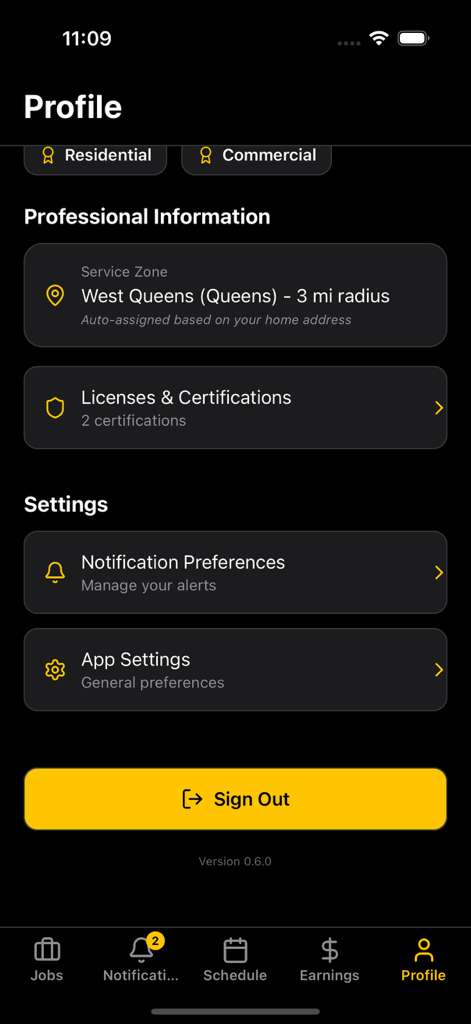
Go to Profile Settings
Tap 'Profile' in the bottom navigation, then tap 'App Settings.'
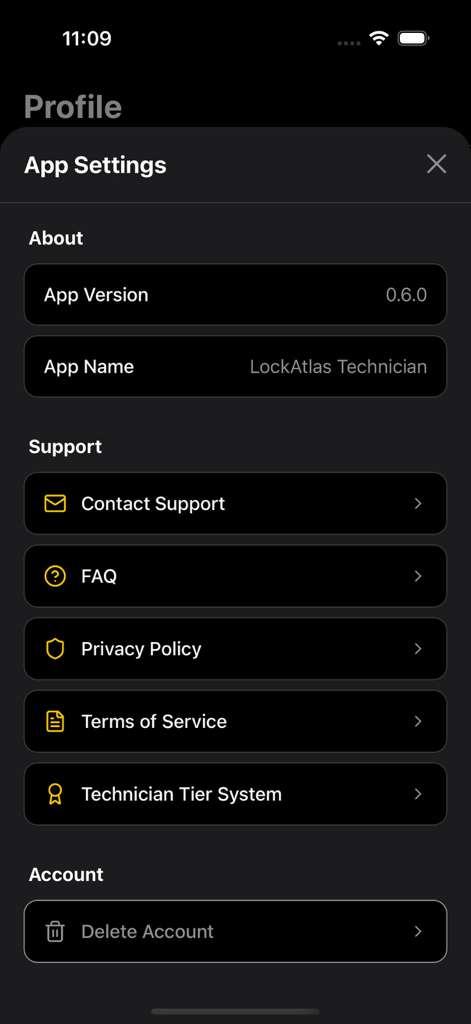
Navigate to Account Settings
Scroll down in App Settings and tap 'Delete Account' under the Account section.
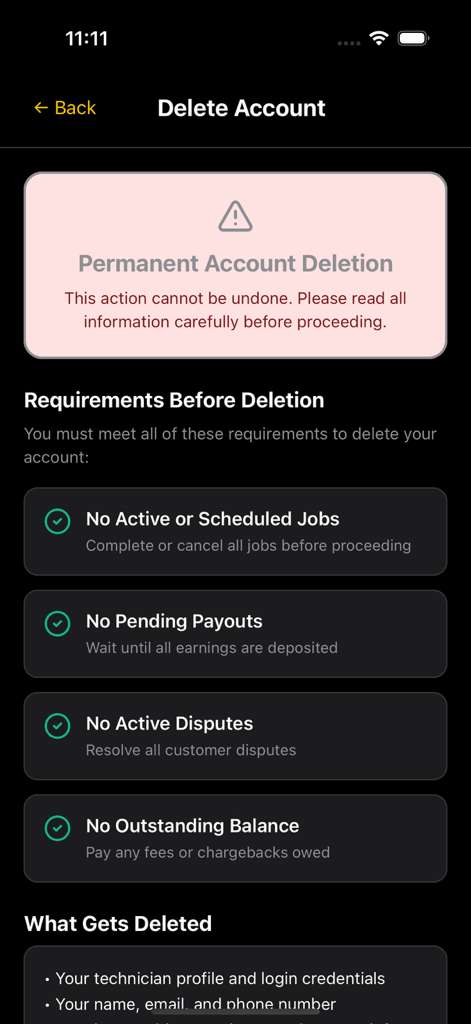
Review Requirements
The app will check if you meet all deletion requirements (no active jobs, no pending payouts, etc.).
Select 'Delete My Technician Account'
Scroll to the bottom and tap 'Delete My Technician Account.'
Confirm Deletion & Acknowledge Retention
Read the deletion notice carefully. You'll need to acknowledge that tax records will be retained for 7 years (IRS requirement), insurance/background check records retained for 7 years, deletion is permanent and cannot be undone, and you understand you won't receive further payouts after deletion.
Enter Password to Verify
Enter your account password to verify your identity, then tap 'Yes, Delete My Account.'
Check Your Email
You'll receive a confirmation email within 24 hours with deletion request confirmation, 30-day processing timeline, tax record retention notice, and final payout information (if applicable).
Timeline
- Day 0: Deletion requested → Account immediately deactivated (can't receive jobs)
- Day 1: Confirmation email sent
- Day 30: Account and personal data permanently deleted
- Year 7: Tax/legal records permanently deleted
Can't Access the App?
You can also request account deletion by email
If you cannot access the LockAtlas Technician app (lost phone, forgot password, etc.), you can request account deletion by email:
- 1Send an email to: technicians@lockatlas.com
- 2Subject line: "Technician Account Deletion Request"
- 3
Include in your email:
- Full legal name on the account
- Email address associated with the account
- Phone number associated with the account
- Technician ID (if known)
- Last 4 digits of SSN (for identity verification)
- Acknowledge: "I understand tax records will be retained for 7 years"
- 4We will verify your identity and check deletion requirements (no active jobs, no pending payouts)
- 5If you meet requirements, we'll process the deletion within 30 days
- 6You'll receive a confirmation email once your account is deleted
What Happens to My Final Payout?
You'll receive any pending earnings before deletion
Complete All Jobs
Finish all active jobs and mark them complete in the app.
Wait for Next Payout Cycle
Payouts happen every Wednesday. Your final payout will be processed on the next Wednesday after all jobs are complete.
Then Request Deletion
Only after your final payout is deposited should you request account deletion.
Bank Account Stays Active Until Payout
Your Stripe Connect account and bank details remain active until the final payout is sent, then they're deleted.
Important Payout Warning
If you delete your account BEFORE receiving your final payout, you may forfeit unpaid earnings. Wait until Wednesday's payout clears!
Can I Reactivate My Technician Account?
Deletion is permanent
Cannot Be Reactivated
Once your account is deleted (after the 30-day processing period), it CANNOT be reactivated. If you want to work with LockAtlas again in the future, you'll need to:
- • Reapply as a new technician
- • Submit all documents again (license, insurance, background check)
- • Go through the full verification process
- • Your previous earnings history will NOT transfer to the new account
30-Day Grace Period
You have 30 days from the deletion request to change your mind. During this time, contact technicians@lockatlas.com to cancel the deletion. After 30 days, deletion is permanent.
Frequently Asked Questions
Your Data Rights (GDPR/CCPA)
We comply with all privacy regulations
Right to Access
Request a copy of all data we have about you. Email technicians@lockatlas.com.
Right to Correction
Update or correct your personal information in the app settings.
Right to Deletion
Delete your account and personal data (this page explains how). Note: Tax records retained for 7 years per IRS law.
Right to Portability
Request a machine-readable copy of your data to transfer to another platform.
Right to Object
Opt out of marketing emails (you'll still receive tax/legal notices).
Right to Non-Discrimination
You won't face penalties for exercising your privacy rights.
Contact for Privacy Requests:
privacy@lockatlas.com (general) • technicians@lockatlas.com (technician-specific)
We respond to all privacy requests within 45 days (GDPR/CCPA requirement).
Ready to Delete Your Technician Account?
Remember: This action is permanent. Tax records will be retained for 7 years per IRS law.
Need help? Our technician support team is here: technicians@lockatlas.com or (929) 681-5005