Stop guessing
locksmith prices.
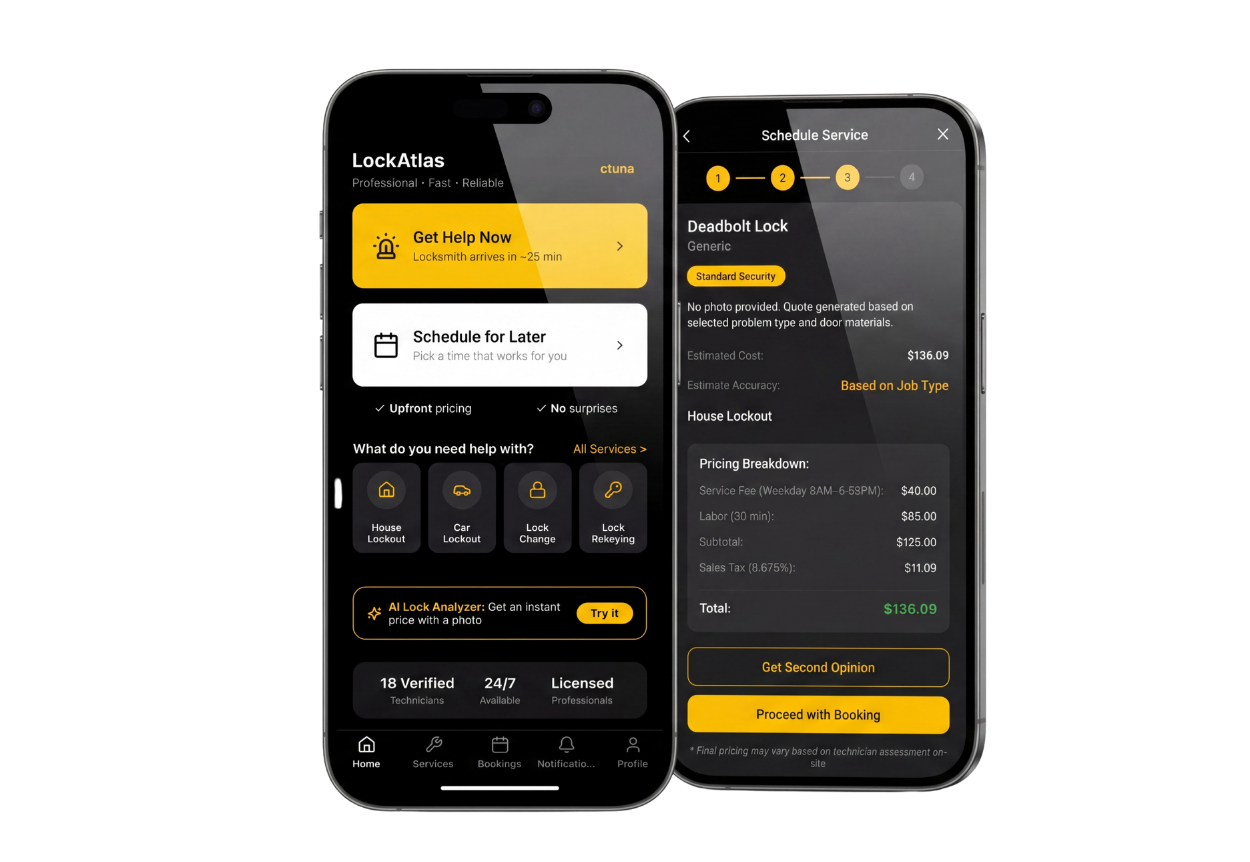
See the price breakdown before you confirm.
Add a photo of your lock and review the estimate before booking. If the work changes, approve the proposed adjustment before additional work begins.
Locksmith Services in NYC
Describe the work, check availability and review the price for your request in the app.
Emergency Lockouts
Request help with a lockout and check current availability.
Residential Locksmith
Lock changes, rekeying, and upgrades for apartments and homes.
Commercial Locksmith
Master key systems, access control, and business security.
Car Locksmith
Auto lockouts, key replacement, and transponder programming.
Smart Lock Install
Ask about installation for your door and chosen hardware.
Lock Rekeying
Ask whether your existing locks can be rekeyed for new keys.
Lock Installation
Deadbolts, mortise locks, and high-security systems.
Lockout Service
Request help with home, car or office access.
Your visit, step by step
How LockAtlas Works
From describing your lock to reviewing the receipt, here is what to expect in the app.
See the Full WalkthroughStep 1: Tell us what you need
Choose a service, enter your address and describe the lock problem. Add a clear photo when available.
Step 2: Know who is coming
Once a technician accepts, check their details and follow booking updates in the app.
Step 3: Review the price breakdown
Check the service fee, labor, parts and applicable tax before confirming your request.
Step 4: Review the work and receipt
Confirm the agreed work with your technician. After service, review the payment and keep your booking record.
A change in the work needs your decision.
If extra work is proposed, review the reason and revised price breakdown. Approve or decline the adjustment in the app before additional work begins.
Cancellation charges may still apply if you end the booking. Review pricing and fees.
Why LockAtlas Is Different
Understand the work, the price and who will arrive before arranging the visit.
Check Technician Details
Check your assigned technician's identity and credentials. Ask support if anything does not match.
Review Pricing Before Booking
Review the estimate and current fee breakdown in the app before you confirm your request.
Real-Time GPS Tracking
Follow the assigned technician's progress in the app. Arrival estimates can change with traffic and availability.
Approve Scope Changes
If additional work is proposed, review the reason and revised price before approving it. Cancellation charges may still apply if you end the booking.
Service Areas Across NYC
Choose your borough to learn about services. Check the app for availability at your location and time.
Check the Details Before Work Starts
You can check an individual NYC locksmith's license with DCWPand compare the name with the technician who arrives. Website feedback is moderated; treat a review as booking-verified only when it carries the Verified completed booking label.
Frequently Asked Questions
Straight answers on pricing, licensing, arrival times, and coverage.